View Instructional Recommendations

Teachers and administrators can access instructional recommendations to reteach and reassess standards. A light bulb appears when a standard is selected from the Standards Overview table.
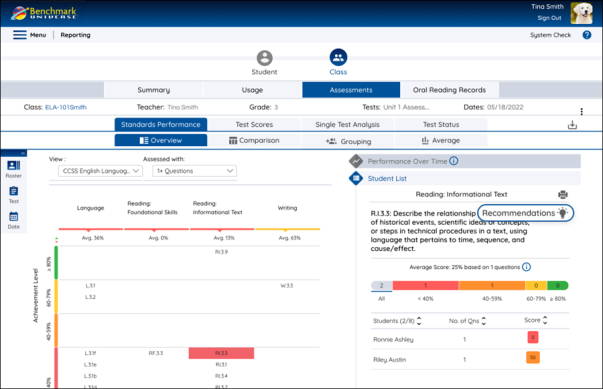
Not all standards for grades K-6 will have instructional recommendations.

Selecting the light bulb opens a pop-up with teacher-facing resources to reteach and reassess the standard. Selecting a reteach or reassess resource will open in a new tab.
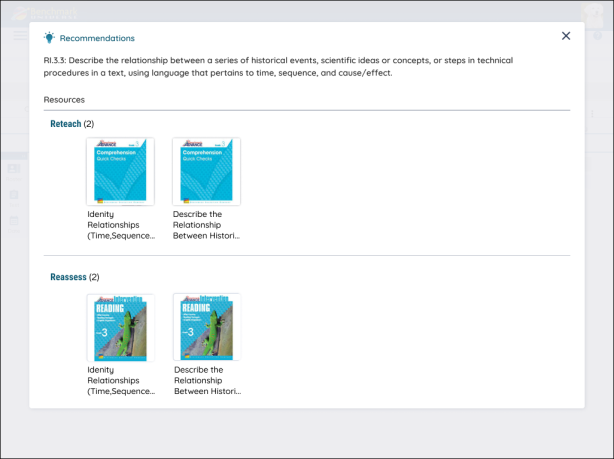
Instructional recommendations are available for Grades K-6 in all editions of Benchmark Advance, beginning with ©2021, and Benchmark Adelante ©2022.

Add Instructional Recommendations to a Bookshelf

Teachers can add Instructional Recommendations to a Bookshelf to seamlessly add one or more recommended resources to an existing or newly created Bookshelf, right from the Reports application! This provides you with a more organized and efficient way to access, manage, and reuse skill-aligned materials for targeted instruction and intervention.

You can add Instructional Recommendations to a Bookshelf by following the steps below:

1. From the Instructional Recommendations pop-up, select the “Add to Bookshelf” icon in the bottom left corner of the Resource Card you’d like to add to a Bookshelf.

You can add multiple resources to a Bookshelf by utilizing the blue checkmark in the top left corner of the Resource Card and then selecting the Bookshelf icon.

2. Once the “Add to Bookshelf” icon is selected, an Add to Bookshelf pop-up appears. Here, you can choose to add the resource to an existing Bookshelf, or create a new one. After the appropriate selections are made, be sure to select Save.

3. Next, you will receive a confirmation banner. The Instructional Recommendations that you were viewing previously will appear on the screen. You can choose to select the X and continue using the Reports application, or you can navigate to the Bookshelf that you added your previous resources to.

4. If you choose the Go to Bookshelf link in the banner, you will be taken to the Bookshelf within the Resource Library.