
Access Recommended Placement (Admin)
Recommended Placement is a time-saving digital solution for teachers that offers a data-driven starting point (Level and Unit) in the Phonics Intervention instructional sequence for each student.
Placement recommendations are based on each student’s performance on the Quick Phonics Assessment (QPA) and/or Quick Spelling Assessment (QSA) following the criteria outlined in the Assessment & Screener Handbook. These measures are administered using Benchmark’s Foundational Skills Assessments.
District and school administrators can view student details in Recommended Placement but cannot modify them. To learn more about Recommended Placement, see the following pages.
About Recommended Placement Table
Changing a Student's Placement
Access Recommended Placement from the Dashboard
You can enter Recommended Placement from your Dashboard using the following steps.
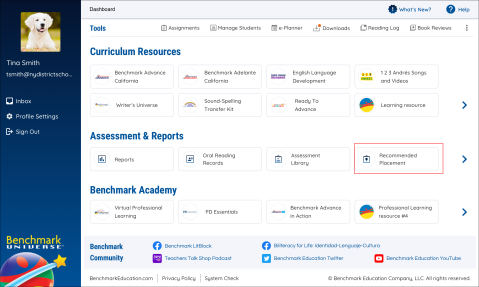
- Log into Benchmark Universe.
- Click the Recommended Placement icon on the Dashboard.
Access Recommended Placement from the Main Menu
You can enter Recommended Placement from anywhere other than the Dashboard using the following steps.
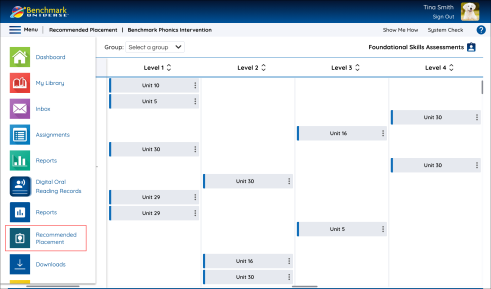
- Click the Menu icon in the upper-left corner.
- Click the Recommended Placement icon on the menu list.
When administrators access Recommended Placement, they’ll arrive at the following modal.
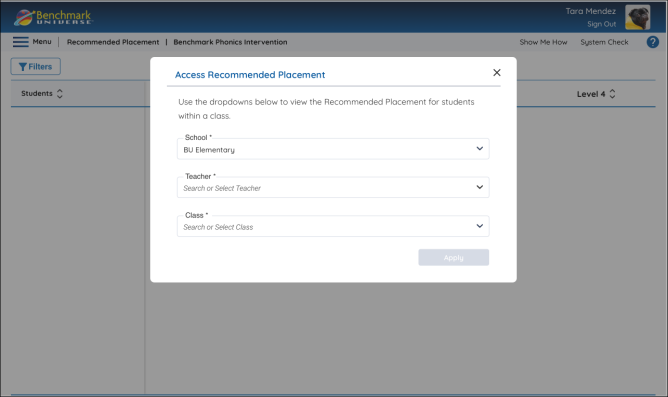
Here, administrators can select the School, Teacher, and Class whose Recommended Placement data they would like to view using the dropdowns and pressing the Apply button.
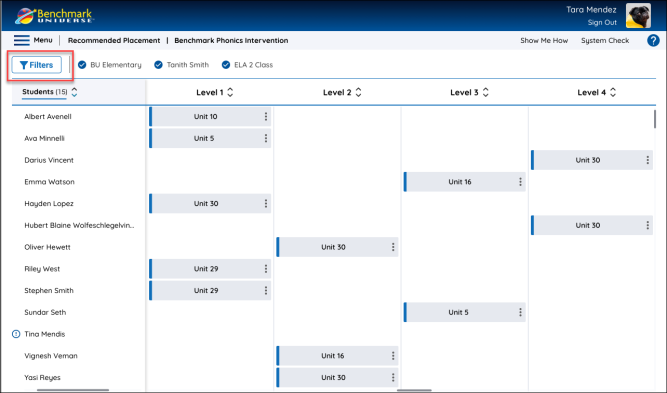
Administrators can access the data selection modal and change their current selection using the Filters button.