
About the Reading Log
The Reading Log lets teachers track student reading and reviews in one location. It provides a view of what your students have achieved and offers great tools for thinking about where to go next with your instruction.
The Reading Log also allows teachers to sort information based on class, books read as part of an assignment or independently chosen, progress status, and timeframe. Teachers can access reviews written by students, either approve or ask students to revise their reviews, and send their comments back to the student. The Reading Log also displays a tally of all books read by a class.
Reading Log at a Glance
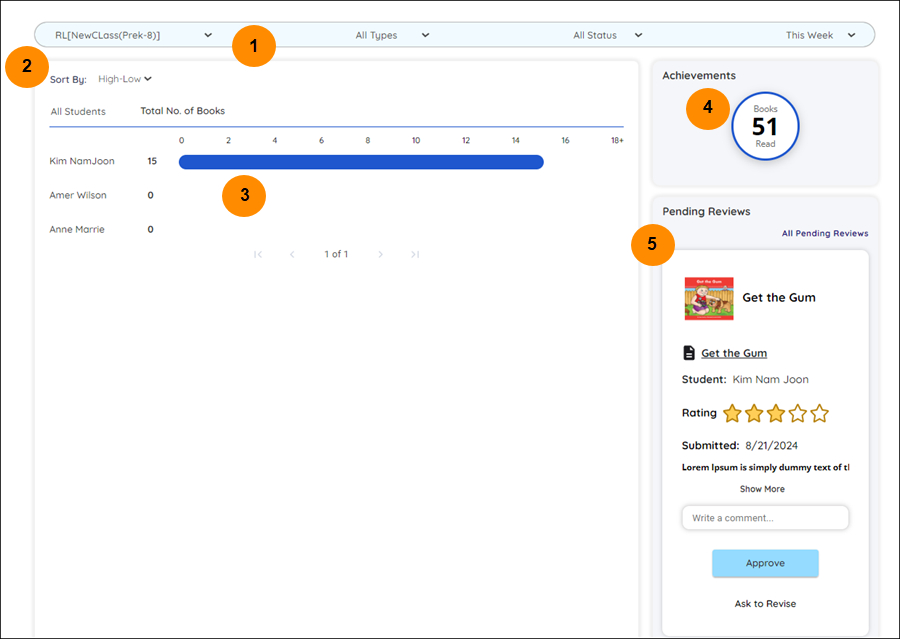
| Reading Log Legend | Description |
|---|---|
|
Use the dropdowns to sort information based on class, books read as part of an assignment or independently chosen, progress status, and timeframe. |
|
Use the dropdown to sort students by number of books in ascending or descending order. |
|
A list of students in a class and the number of books completed according to status and timeframe. Select a student’s name to go to the student’s Reading Corner. |
|
The number of books read by a classroom. |
|
The title of a book and its accompanying student review. Approve a review or ask for revisions in this corner. |
Last Updated: February 05, 2025