
Access Reports
Teachers and Administrators can use a variety of access points in Benchmark Universe to quickly see Reports with useful data for identifying trends and gaps in their students’ performance.
You can enter Benchmark Reports from the following locations.
Access Reports from the Dashboard
You can enter Reports from your Dashboard using the following steps.
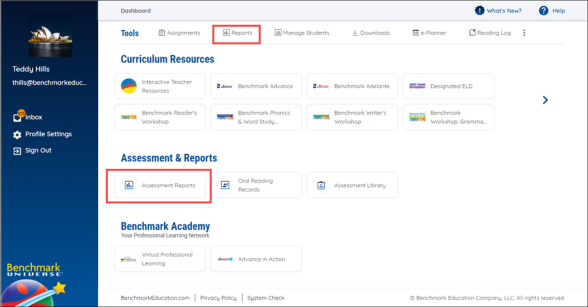
- Log into Benchmark Universe.
- Click the Reports icon on the Dashboard. The Reporting Suite appears.
Access Reports from the Main Menu
You can enter Reports from anywhere other than the Dashboard in Benchmark Universe using the following steps.
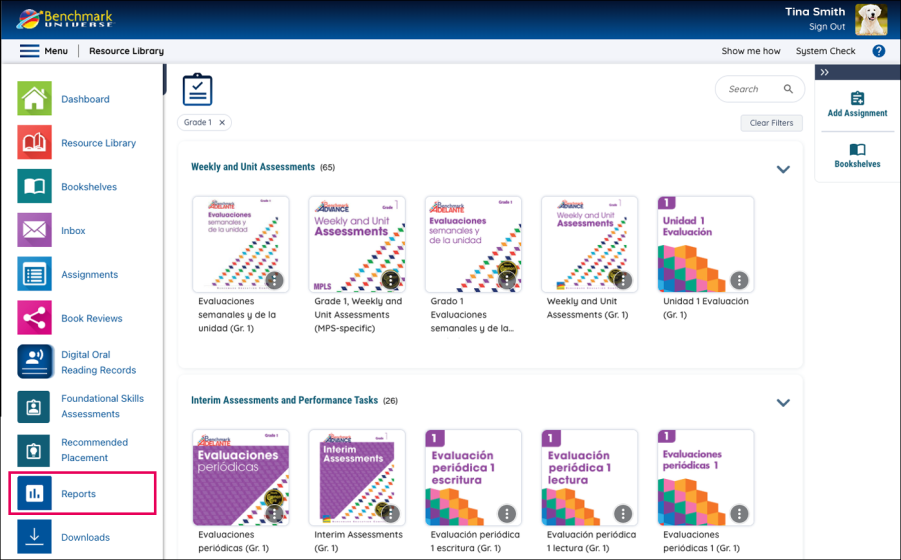
- Log into Benchmark Universe and select a Classroom Management resource (or other page).
- Click the Menu icon in the upper-left corner.
- Click the Reports icon on the menu list. The Reporting Suite appears.
Access Reports from Grade View
You can also enter Reports through Grade View by following these steps.

- Click Assignments on the Dashboard or select the Assignments icon on the Menu. The Assignments list appears.
- Find and open an assignment containing an assessment.
- Click the assignment. The Assignment Details page opens.
- Click the Open Book icon or Grade View button above the list of students.
- Click on the Reports button to the right of the Assignments button.